Curve Interpolator/Extrapolator
The Curve Interpolator/Extrapolator process interpolates the well curve using the method defined for each layer in the windowing model, and/or extrapolates the well curve to the top and base of the model if necessary.
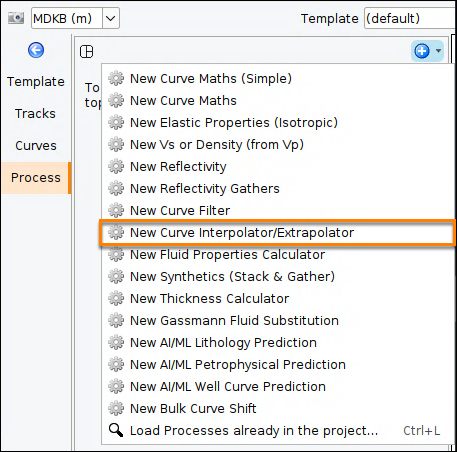
- In the Control Panel, go to View > New Single Well View.
- In the Single Well window, open the Process tab.
- At the tab header, click the blue "+" icon.
- Select New Curve Interpolator/Extrapolator.
- Type a name for the process and click OK.
Configure the Curve Interpolator/Extrapolator
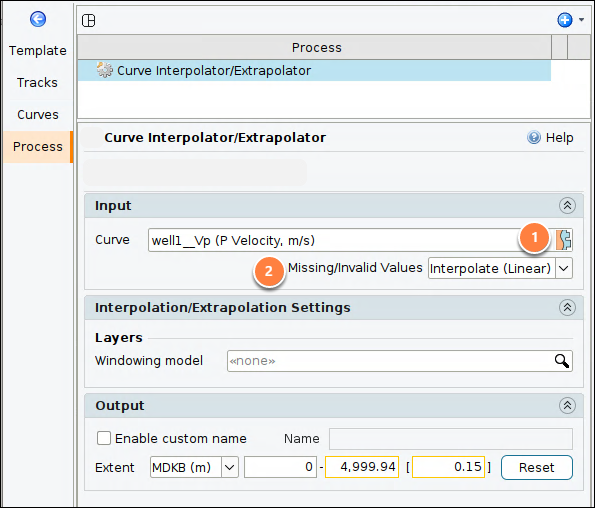
- Curve: Select a well curve.
- Missing / Invalid Values: Choose the action when input variables are unavailable, null or invalid prior to filtering. This rule is applied when calculating each sample:
- Interpolate: Interpolate missing values using the class interpolation setting.
- Output is Null:
- Output null (empty value) if the value of any curve is invalid.
- Output null (empty value) if the result is invalid.
- Output is 0:
- Output zero if the value of any curve is invalid.
- Output zero if the result is invalid.
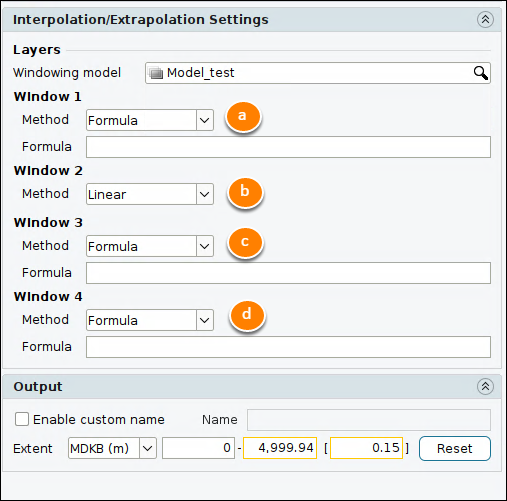
- Windowing model: Select an existing windowing model (see Creating a Windowing Model).
- Method:
- Formula: A constant number or a user defined formula such as V0+K.
- Linear: Calculates a linear function based on the first and last point of the log curve in a window. If only 1 point is available, the value is extrapolated.
- Volume: Where a log curve is not available, takes the value from the volume. Only a volume in the same domain as the output extent is accepted.
- Horizon: Where a log curve is not available, takes the horizon property value.
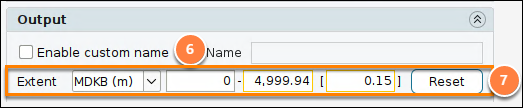
- By default, the output curve name uses the following values: extrap: Curve Class Process Name.
- For example: extrap: P Velocity Curve Extrapolator.
- Enable custom name: Allow the user to define the process output curve name.
- Extent: Output can be in MDKB, TWT or TVDSS domain.
- Enter the start, stop and step size.
- Reset: automatically set the start and stop values to match the input curve.