Working with 2D Surveys
A 2D survey is a collection of related 2D lines. Each line is defined by a set of tie points that link common midpoint (CMP) locations to eastings and northings (X/Y).
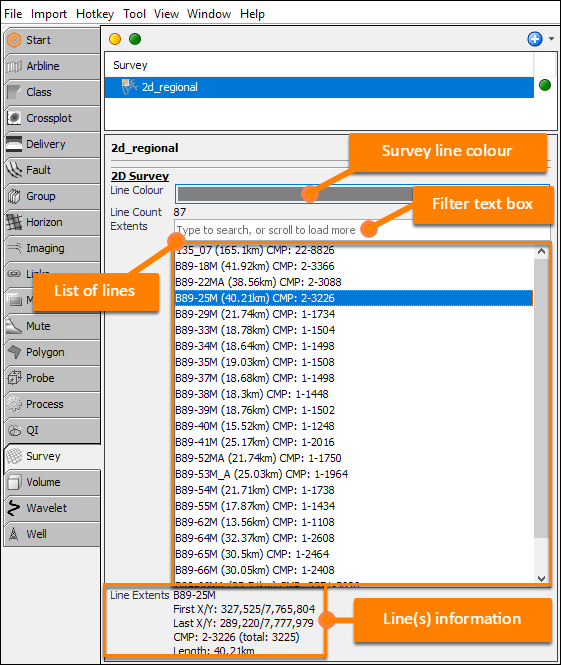
- Surveys are found in the Survey tab of the Control Panel.
- Select a 2D survey to show its details in the panel below.
- Survey name
- Line colour: The display colour for lines in views.
- Line count: The number of lines in the survey.
- Search box: Type text to show matching lines.
- A list of the lines in the 2D survey, matching the search
- Information on selected line(s).
- One or more 2D lines can be selected:
- Single line: Click the line.
- Consecutive lines: Click the first line, press Shift and left-click the last line.
- Any lines: Press Ctrl button and left-click each line.
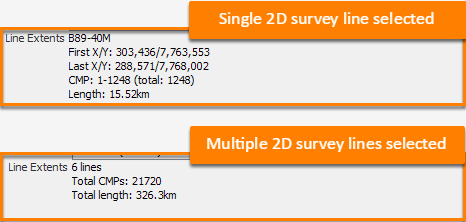
When a single 2D line is selected:
- The extents information shows the start and end coordinates, the CMP range, and the length.
When multiple lines are selected:
- The extents information shows the total number of lines, the total CMP count and the total line length.
2D Survey Context Menu
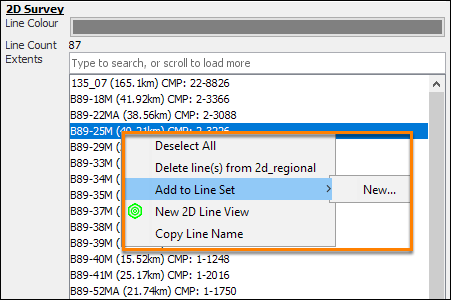
Right-click to access the context menu.
- Deselect All: Clear the line selection.
- Delete line(s) from 'survey_name': Remove selected line(s) from the survey.
- Add to Line Set: Add selected line(s) to a new or existing line set (see Managing 2D line set).
- New 2D Line View: Show line(s) in a new 2D Line View (see Viewing Lines in 2D Line Views).
- Copy Line Name: Copy names of the line(s) to clipboard.