How do I find the RMS amplitude for a single trace over a given time window? How do I do this with a synthetic?
For a single trace from a volume
.png)
-
Go to the Process tab and create a new Probe. Type a name for this probe e.g. "OneTraceProbe".
-
Set the IL/CL size manually in the details panel. Use the same value for min and max for each extent.
-
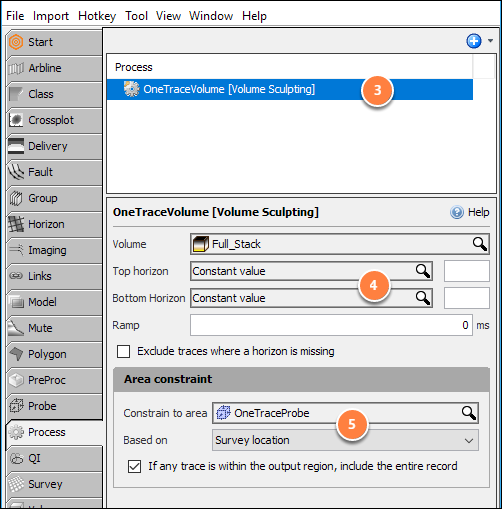
While still in the Process tab, create a Volume Sculpting process and type a name for it e.g. "OneTraceVolume".
-
Select your volume in the Input Volume text box.
-
Select the earlier created probe (e.g. "OneTraceProbe") for the Constrain to area option and choose Based on Survey location.
.png)
-
Next, create a Volume Interpolation/Extrapolation process.
-
Select the Input Volume as the one created from the Volume Sculpting process e.g. "OneTraceVolume".
-
Tick the Extrapolate checkbox.
-
For Extents, select a small arbitrary area around the probe, approximately 20 x 20 traces.
.png)
-
In the Map View, click the Operations tab on the right and select Amplitude Extraction in the Operations dropdrop box.
-
Set the interval to analyse by entering a top and base (constant) time, or by choosing horizons.
-
Choose your created volume from the Volume Sculpting process e.g. "OneTraceVolume" for the Volume option.
-
Select Property as "RMS".
-
Click the Run button.
-
Set the class to "RMS" and click the "Create New" button.
The map view will return a single result for the extrapolated area containing the RMS (or other property) for the single trace.
For a synthetic trace from a well
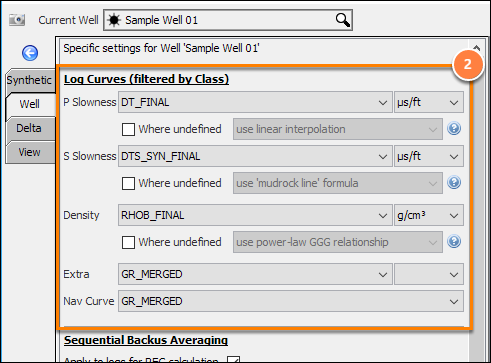
To generate the volume for the synthetic trace:
-
Go to Tool > Synthetics to configure the well in the Synthetics window.
-
Click the Well tab and select the input well curves for the synthetic: P Slowness, S Slowness and Density.
-
Select the Angle, Wavelet, and Stack parameters in the Synthetics tab.
-
Confirm that a synthetic is generated!
-
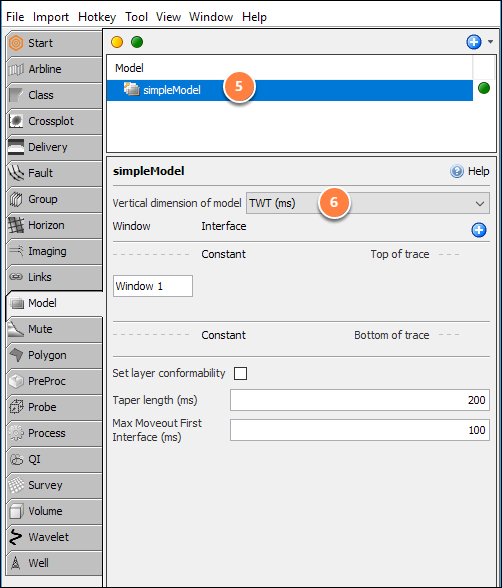
Go to the Model tab and create a new arbitrary window Model. Type a name for the model e.g. "simpleModel".
-
Select TWT domain for the Vertical dimension of model setting. It does not require any windows or layers.
-
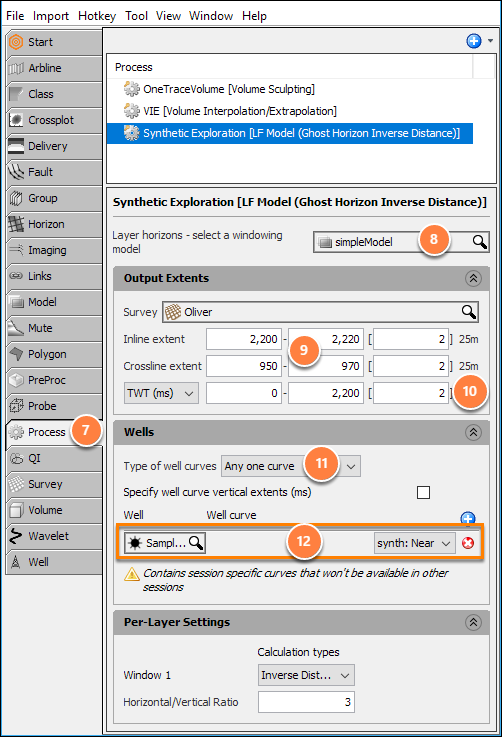
Go to the Process tab and create an LF Model (Ghost Horizon...) process. Name the process e.g. "Synthetic Extrapolation".
-
Select the earlier created Model as the Layer horizons e.g. "simpleModel".
-
In Output Extents, pick a small arbitrary area around the well, approximately 20x20 traces.
-
Set the TWT sampling to 2 or 4ms (match the rate of the seismic).
-
Select Type of well curves as "Any one curve".
-
Select the well and the "synth: (near)" synthetic trace - If the trace isn't listed, confirm that the synthetics are configured correctly (from step 1).
-
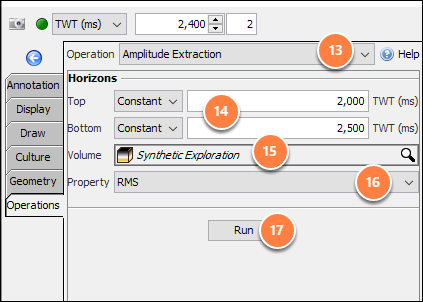
In the Map View, click the Operations tab on the right and select Amplitude Extraction in the Operations dropdrop box.
-
Set the interval to analyse by entering a top and base (constant) time, or by choosing horizons.
-
Choose your created volume from the LF Model process e.g. "Synthetic Extrapolation" for the Volume option.
-
Select Property as "RMS".
-
Click the Run button.
-
Set the class to "RMS" and click the "Create New" button.